Corporate trainers, instructional designers, and HR professionals share a specific and persistent frustration: producing training video content that works across different languages, departments, and skill levels is extraordinarily resource-intensive under traditional production models. Recording a single English-language training module is manageable.
Recording that same module in six languages with consistent visual quality, accurate lip-sync, and professional presenter delivery is a project that can consume months of budget and coordination. AI video tools have made this kind of multilingual, multi-format training content production genuinely achievable for teams of any size — and the workflow is more straightforward than most people expect.
Understanding What These AI Tools Actually Deliver
Getting clear on the capabilities of your chosen platforms before you begin prevents the mismatched expectations that derail most first-time AI video projects.

Pollo AI's Photo Video Maker runs on Seedance 2.0, a multimodal AI engine that takes text descriptions, reference images, audio inputs, and existing video footage as creative starting points. It generates hyper-realistic physical motion rendering, preserves character and visual style consistency across an entire video project, replicates professional-grade cinematic transitions, interprets storyboard and script logic intelligently, and extends video timelines seamlessly in either direction.
For training content that needs to look polished and consistent across dozens of modules, Pollo AI's Photo Video Maker provides the visual production backbone that makes large-scale content creation manageable.Pairing this with a dedicated presenter tool creates a complete production pipeline.
The HeyGen AI Video Generator specializes in AI avatar-driven video content — featuring over a thousand photorealistic human avatars with accurate lip-sync, natural hand and body gestures, voice cloning, and support for more than 175 languages with 4K commercial output quality. Together, these platforms cover every layer of professional training video production without requiring a single camera, studio booking, or on-screen talent fee.
Tools and Materials Preparation
Before opening either platform, gather the following: a complete script for each training module written in your primary language, a list of the target languages you need to localize into, any existing brand guidelines or visual style references, screen recordings or product screenshots if your training covers software, and a clear outline of the learning objectives each video module needs to address. Having this material organized in advance means your time inside the platform is spent creating rather than planning.
Step-by-Step Tutorial: Building a Multilingual Training Video
Step 1: Write a Modular Script Designed for AI Production
Training scripts written for AI video production work differently from scripts written for human presenters. Keep sentences shorter than you normally would — AI narration handles concise, declarative language more naturally than complex subordinate clauses.
Break your content into discrete modules of two to four minutes each rather than producing one long video, as shorter modules are easier to localize, update, and distribute selectively. Mark each section of your script with the visual content it should accompany, so the AI platform can match narration timing to on-screen imagery accurately.
Step 2: Build Your Visual Scenes in Pollo AI
Open Pollo AI's Photo Video Maker and begin constructing the visual layer of your training content. Use text prompts to generate scene backgrounds, product demonstration sequences, and contextual imagery.
Upload any existing screen recordings or product photographs as reference inputs — the Seedance 2.0 engine incorporates these alongside your text descriptions to produce output that is visually grounded in your actual product or workflow rather than generic stock imagery.
Apply consistent visual style settings across all scenes to ensure your finished modules look like a unified series rather than a collection of disconnected clips.
Step 3: Set Up Your AI Avatar Presenter
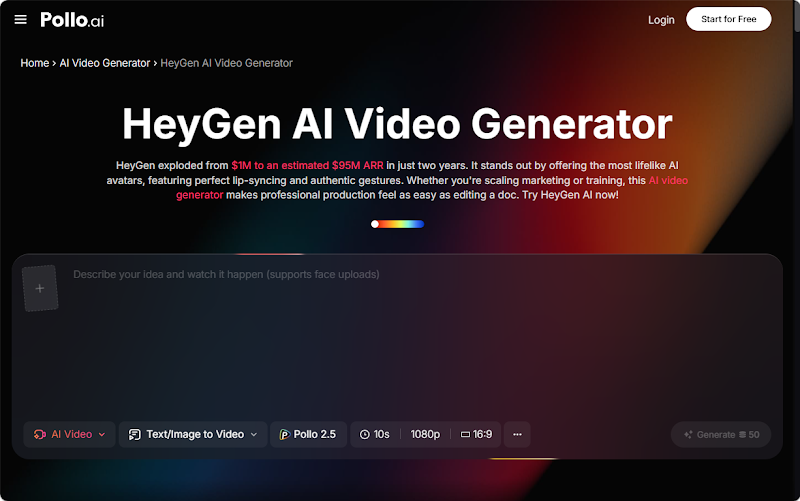
Switch to the HeyGen AI Video Generator and select an avatar that matches the professional demographic and cultural context of your target audience. For a global training rollout, consider selecting a neutral-presenting avatar that reads as approachable and professional across different cultural contexts rather than one that is strongly associated with a specific regional identity.
Record or paste your script into the voiceover tool, select the appropriate language, and generate your presenter segment. The platform's lip-sync engine ensures that the avatar's mouth movements match the audio precisely, which is the detail that most determines whether AI presenter content feels credible or artificial.
Step 4: Localize Into Additional Languages
Once your primary language version is complete and approved, use the HeyGen AI Video Generator's language translation and voice cloning features to produce localized versions. The platform supports more than 175 languages and can clone the vocal characteristics of your original narration track into each new language, maintaining tonal consistency across all versions.
This means your Spanish, Mandarin, French, and Arabic training modules will feel like they were recorded by the same presenter — because in every meaningful sense, they were. Review each localized version for timing accuracy and cultural appropriateness before approving it for distribution.
Step 5: Integrate Presenter Segments With Visual Content
Return to Pollo AI's Photo Video Maker to combine your presenter segments with the visual scenes you built in Step 2. Use the platform's cinematic transition presets to move cleanly between presenter-led sections and demonstration sequences.
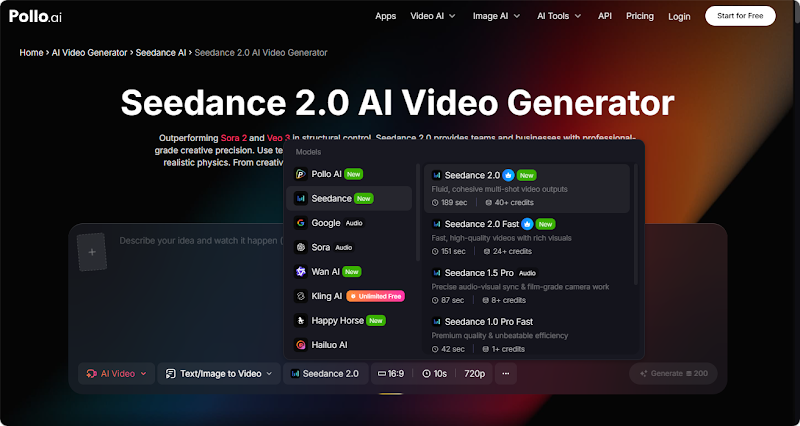
The Seedance 2.0 engine's footage extension capability is particularly useful here — if a demonstration sequence runs slightly shorter than the narration it accompanies, you can extend it forward in time without regenerating the entire scene. Review the integrated video for pacing, checking that transitions feel natural and that the visual content always reinforces rather than competes with the narration.
Step 6: Export in Format-Appropriate Resolutions
Export each finished module at the resolution appropriate for its distribution channel. Internal LMS platforms typically accept 1080p MP4 files without issue. External-facing training content, compliance videos, or customer education materials that will be displayed on large screens or embedded in high-visibility locations should be exported at 4K where the platform supports it.
The HeyGen AI Video Generator's 4K commercial output capability is particularly valuable for customer-facing training content where visual quality directly reflects on brand credibility.
Common Mistakes and Important Notes
The most damaging mistake in multilingual training video production is approving localized versions without having a native speaker review them. AI translation is highly accurate but not infallible, and a single mistranslation in a compliance training video can create significant liability. Build a native speaker review step into your workflow for every language before any localized version goes live.
Avoid making your training modules too long. Research consistently shows that learner engagement drops sharply after four minutes in video-based training. If your content requires more time than that, break it into a structured series of shorter modules with clear titles and learning objectives rather than producing a single extended video.
Conclusion: Build a Scalable Training Video System
The combination of Pollo AI's Photo Video Maker and the HeyGen AI Video Generator gives training and content teams a genuinely scalable production system. Use Seedance 2.0 to build visually consistent, brand-aligned scenes, use the avatar and localization tools to create presenter-led content in every language your audience speaks, and commit to a review process that catches errors before distribution.
Once your workflow is established, producing a new training module in six languages becomes a matter of hours rather than weeks — and that efficiency compounds with every project you complete.